

What Is a Unified Inbox? Customer Messaging Without Switching Apps
A unified inbox, also called a combined inbox, is a single list where your team sees and answers customer messages from several sources, such as website chat, WhatsApp, Telegram and Instagram, without opening each app separately. Unlike a personal email inbox that merges your own mail accounts, a team inbox for customer messaging is shared: every conversation has a status and an owner, colleagues can hand it over, and the reply goes back to the customer in the channel they wrote from.

This article separates the two meanings of "unified inbox", shows what a team actually sees and does in a customer messaging inbox, and gives a checklist for choosing one.
Two things people call a unified inbox
The phrase is used for two different tools, and mixing them up leads to the wrong purchase.
The email meaning: a combined inbox for your own accounts
Most email apps can show mail from several accounts in one view, so you can read your work and personal addresses in one place. This is a personal convenience: one person, several mailboxes, no assignment and no shared queue.
Email is also changing. Google started removing two ways Gmail pulled mail from other providers in January 2026: Gmailify and POP fetching ("Check mail from other accounts"), as 9to5Google reported in January 2026. The Gmail mobile apps can still add other accounts over IMAP, and on the web Google suggests forwarding instead. If your "combined inbox" relied on those features, it is worth checking how mail now reaches you.
The customer messaging meaning: a shared team inbox
A business inbox for customer messages is built for a team. Messages from the website chat and from messengers arrive in one queue. Each conversation belongs to one customer, has a status (new, in progress, closed), and can be assigned to a person or a department. This is what support and sales teams usually mean when they ask for a unified inbox, and it is what the rest of this article covers.
Personal email combined inbox | Team inbox for customer messaging | Helpdesk ticketing | |
|---|---|---|---|
Who uses it | One person | A team | A team |
Sources | Your email accounts | Website chat, messengers, sometimes email | Mostly email and web forms, often chat |
Unit of work | A message | A conversation with one customer | A ticket |
Assignment and statuses | No | Yes | Yes |
Real-time chat | No | Yes | Varies |
Channel rules (reply windows, templates) | No | Must handle them | Varies |
Typical question it answers | "Did I get mail?" | "Who is answering this customer right now?" | "Is this case resolved?" |
Some products do both email and messengers in one queue; many don't. If email support matters to you, check it explicitly, because "unified inbox" on a product page doesn't guarantee email is included.
What a team sees in a customer messaging inbox
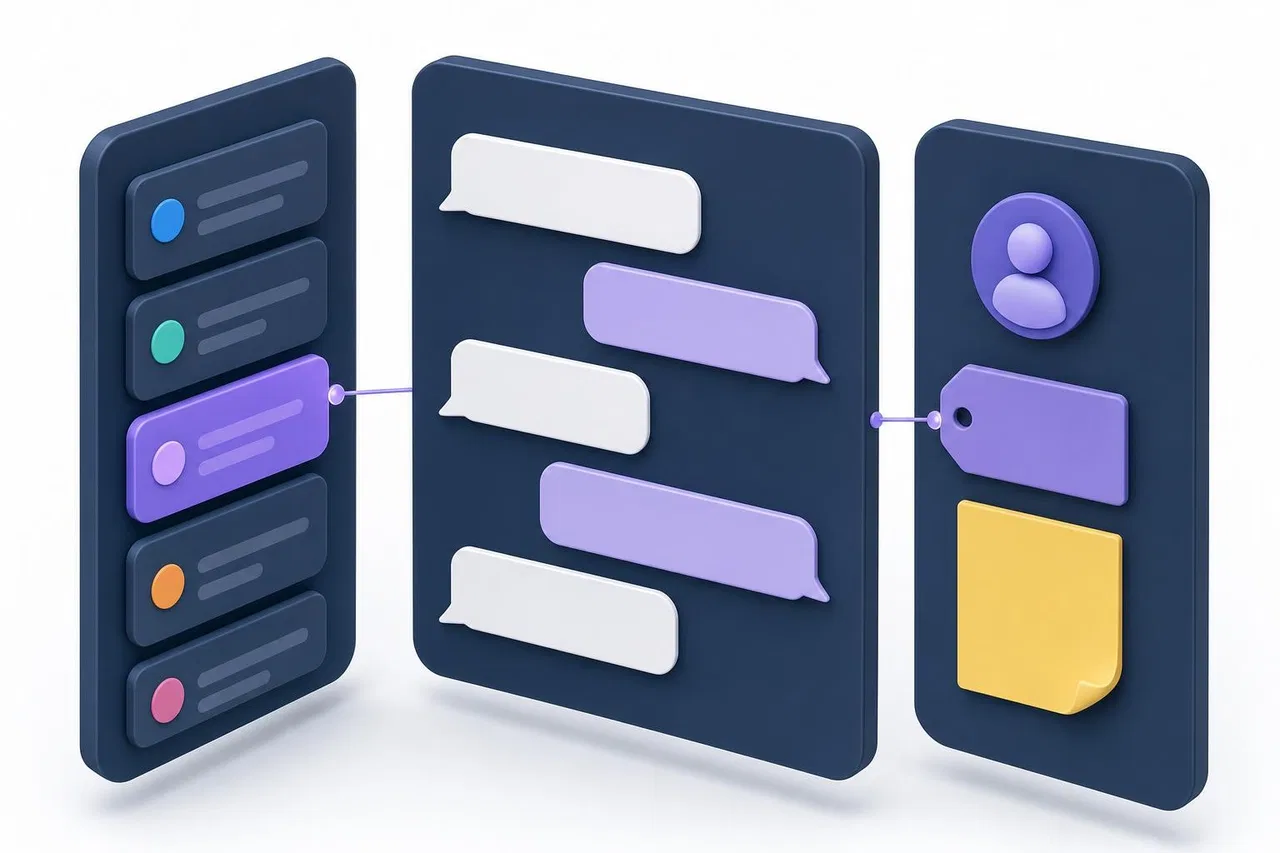
A good combined inbox has a simple layout that stays the same across channels.
The list. All conversations the person can see, newest activity first, with the customer's name, the channel, a preview and an unread mark. Filters for status, department and channel narrow it down.
The conversation. The full history with this customer: messages, files, voice notes, and replies from colleagues or an AI assistant. The reply box sends to the channel the customer is on.
The info panel. Who is assigned, the department, the priority, internal notes, and where the customer came from, such as the website page they wrote from.
Channel status. For WhatsApp and Instagram, whether the 24-hour reply window is still open. For any channel, whether a reply was delivered.
The goal is that an agent never has to ask "where did this come from?" or "who else is answering?" because the screen already shows it.
How a team works in a unified inbox day to day
Picking up and owning a conversation
Opening a conversation to read it shouldn't make you its owner. Ownership should come from an explicit action: you are assigned, you take it, or you reply first. That way team leads can read along without accidentally taking work from colleagues.
Handing over
When a question needs someone else, such as billing, a specialist or another shift, the agent transfers the conversation to a colleague or department. The history stays with it, so the next person reads the thread instead of asking the customer again.
Internal notes
Notes are messages the customer doesn't see: "check the delivery date with the warehouse", "VIP, offered a discount last month". They keep the team's reasoning next to the conversation instead of in a side chat.
Continuing across channels
A customer may start in the website chat and continue in a messenger. A good inbox links both into the same conversation, so the agent sees the earlier messages. Without that, you get two conversations with the same person and two agents answering them.
Closing and reopening
A resolved conversation is closed but stays in the history. If the customer writes again, it reopens and returns to the queue. Spam should stay closed.
What to check before choosing a combined inbox
Use this checklist when comparing customer messaging platforms for startups and small teams.
Area | Question | Why it matters |
|---|---|---|
Channels | Which channels connect today, and how (official API, your own app, a partner)? | Unofficial connections can break or get numbers banned |
Is email part of the same queue? | Many inboxes cover chat and messengers only | |
Continuity | Does a channel switch continue the same conversation? | Prevents duplicates and repeated questions |
Ownership | Do viewing and taking differ? Can you transfer? | Avoids double answers and orphaned conversations |
Routing | Manual, round-robin, least busy? Response deadlines? | Fair load and fewer forgotten messages |
Access | Can a channel or department be limited to certain people? | Sales and support often need separate views |
Channel rules | Does the agent see the WhatsApp or Instagram window and can they send WhatsApp templates? | Otherwise replies silently fail |
Notifications | Can each agent mute some sources and keep others loud? | Prevents notification fatigue |
AI | Can AI answer in some channels and not others? Does it stop when a person takes over? | Keeps automation under control |
Delivery | Are failed replies marked and retryable? | You need to know a message didn't arrive |
Pricing | Per seat, per conversation, per message? Who bills messenger fees? | Total cost varies widely |
Mobile | Can agents answer from a phone with working notifications? | Small teams rarely sit at desks all day |
Common problems and how to avoid them
The inbox becomes a firehose. One list for everything quickly gets noisy. Split by department, let each agent filter by channel, and set personal notification rules so people hear only what they handle.
Duplicate conversations. When the same customer writes on two channels, you can end up with two threads. Prefer platforms with an explicit handoff from your website to messengers, and agree on one owner per customer.
Replies that never arrive. Messenger rules are strict: WhatsApp and Instagram reject free-form replies after 24 hours, and a Telegram bot can't reach someone who blocked it. Make sure failed replies are visible to the agent, not just logged.
Unclear access. Without channel-level access, either everyone sees everything or someone misses a channel. Decide early which people handle which channel.
Treating the inbox like a CRM. An inbox handles conversations. Deals, contracts and long-term follow-ups belong in a CRM or task tool. Connect them, but don't force one to do the other's job. See WhatsApp CRM Integration and CRM vs. Helpdesk.
Setting up a unified inbox: practical steps
Inventory your sources. Write down every place customers write today: website, WhatsApp numbers, Instagram accounts, Telegram bots, email addresses.
Decide what goes in. Connect chat and messenger channels to the inbox. If email stays in a separate tool, say so to the team so nobody waits for email in the wrong place.
Create departments. Even two, such as "Sales" and "Support", make routing and filtering easier.
Set access and routing. Choose who sees each channel and how conversations are assigned. Set a response deadline.
Write five internal rules. When to take a conversation, when to transfer, what goes in notes, when to close, and who handles WhatsApp templates.
Test each channel. Send a message from your own phone, reply, transfer it, close it, and write again to check it reopens.
Review after two weeks. Look for conversations without an owner, slow replies and duplicate threads.
How Sensever works as a business inbox in a messenger
Sensever's customer inbox is called Requests. Each business creates a project, connects its channels, and the team answers from one queue. The details come from the customer support guide, the messaging channels guide and the channel access guide.
Sources. The project's website chat widget, its contact page, and connected messengers: WhatsApp (Cloud API), Telegram (your bot), Instagram Direct and MAX. Each customer message lands in that customer's request, and replies go back in the same messenger.
Layout. A narrow list on the left with search and filters, the conversation on the right. Filters cover status ("Open", "All", "Closed"), department and channel. The selected project, conversation and filters are kept in the address bar, so you can share a link with a colleague who has access.
Ownership. Viewing a request doesn't make you the assignee. A first reply or an explicit assignment does. Statuses are New, In progress, Closed and Spam; a new customer message brings a closed request back.
Handing over and notes. From the info button in the request header, an agent can transfer the request to a colleague or department, change priority and write internal notes the customer doesn't see.
Context. For website visitors, the info panel shows "Visitor and page history": the page of the first message and later navigation on your site. If a visitor moves from the widget to a messenger, the conversation continues in the same request with the widget history.
Channel rules. WhatsApp and Instagram replies after the 24-hour window show "Not sent". In WhatsApp requests, the agent can send an approved text template from the conversation and sees until when the reply window is open. Undelivered replies have a "Retry" link.
Routing and access. Assignment can be manual, least-busy or round-robin, with per-agent limits. Channel access decides who sees each channel's requests.
Personal notifications. Each agent sets "On home" and "Quiet" for each source: for example, the website widget and the Telegram bot of the same project can be set independently.
AI. The project's AI assistant can answer in the widget, the contact page and messengers, with a separate switch per channel. It pauses when an agent takes the request.
What Sensever's inbox doesn't do: email isn't a project channel, so customer email stays in your email tool. Flow can send its own notifications by email, but that is a separate feature and not a customer inbox. On pricing, per the Sensever landing page, the project owner is free and each additional member who answers customers costs $9 per month.
FAQ
What is a combined inbox?
In email, it's one view of several of your own mail accounts. In customer messaging, it's a shared team list of conversations from website chat and messengers, with owners and statuses.
Is a unified inbox the same as a helpdesk?
Not quite. A helpdesk is built around tickets, often from email and forms. A messaging inbox is built around real-time conversations in chat and messengers. Many tools now overlap, so check which channels and workflows each one actually supports.
Can a unified inbox include email?
Some do, many don't. Check explicitly whether email arrives in the same queue as chat and messengers before you buy.
Does a unified inbox work for a team of two?
Yes. Even two people benefit from seeing who is answering which customer and from keeping the history in one place instead of on one person's phone.
What happens if a customer writes on two channels?
Without a link between channels, you get two conversations. Platforms that support a handoff from the website to a messenger keep it as one conversation.
How is a unified inbox related to omnichannel messaging?
The inbox is the screen where your team works. Omnichannel messaging is the wider approach: context across channels, routing and ownership. Read Omnichannel Messaging and How to Choose Customer Service Software for a Small Team.
Conclusion
A unified inbox removes app switching, but only if it is a team tool and not just a merged list. Separate the email meaning from the customer messaging meaning, check which channels really connect and whether email is included, and make sure ownership, transfers, notes and channel rules work the way your team works. Then test every channel with a real message before you announce the change to customers.

Comments